
Translations#
The Qt Workflow#
The workflow for extracting translatable strings from FlightGear Qt C++ source code or QML files is rather standard and is entirely managed by the core development team. Scenery, aircraft or add-on developers normally don’t need to bother with that.
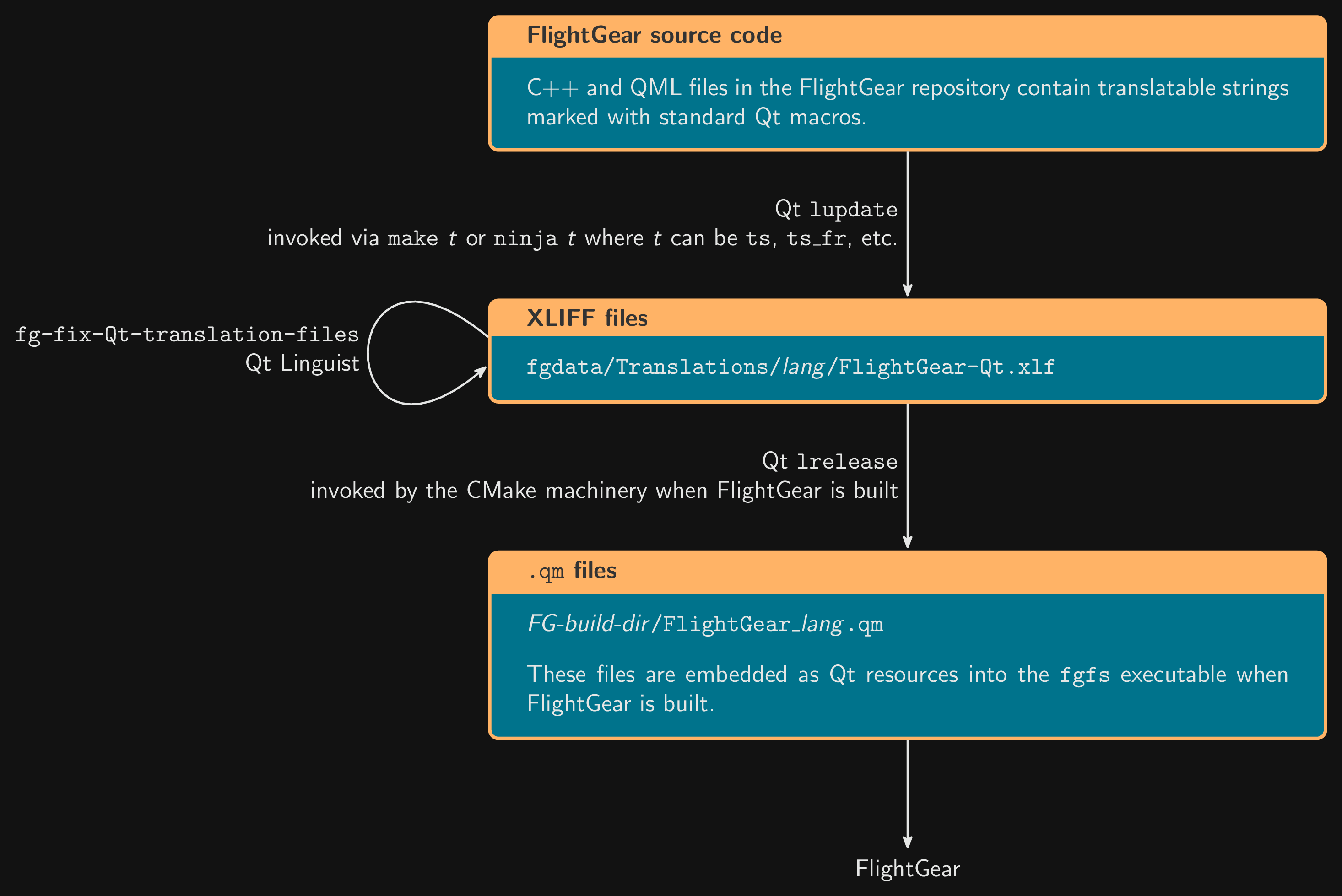
The Qt translation workflow#
Qt translatable strings are extracted from C++ and QML files by the Qt
lupdate tool. The result is written to
fgdata/Translations/lang/FlightGear-Qt.xlf files.
The fg-fix-Qt-translation-files program was used to fix problems in
the FlightGear-Qt.xlf files generated by lupdate. Now that we
pass -disable-heuristic similartext to lupdate, it seems that
these problems don’t occur anymore.
The Non-Qt Workflow#
The workflow for extracting translatable
strings from FlightGear code and assets that aren’t managed by the Qt library
is non-standard, because it needs to integrate with assets in
FlightGear-specific formats such as XML description of GUI dialogs, other
PropertyList files such as weather scenarios, and hopefully Nasal code in the
future. It relies on Python scripts and modules located in the
fgmeta-python repository that are shipped in the flightgear Python
package (fgmeta-python is the source repository of the package). The
scripts and modules extract translatable strings from FlightGear assets and
write the result to XLIFF files that have the .xlf extension. XLIFF is a standard XML-based format; this allows translators to
use nice existing tools such as Qt Linguist to update and review their
translations.
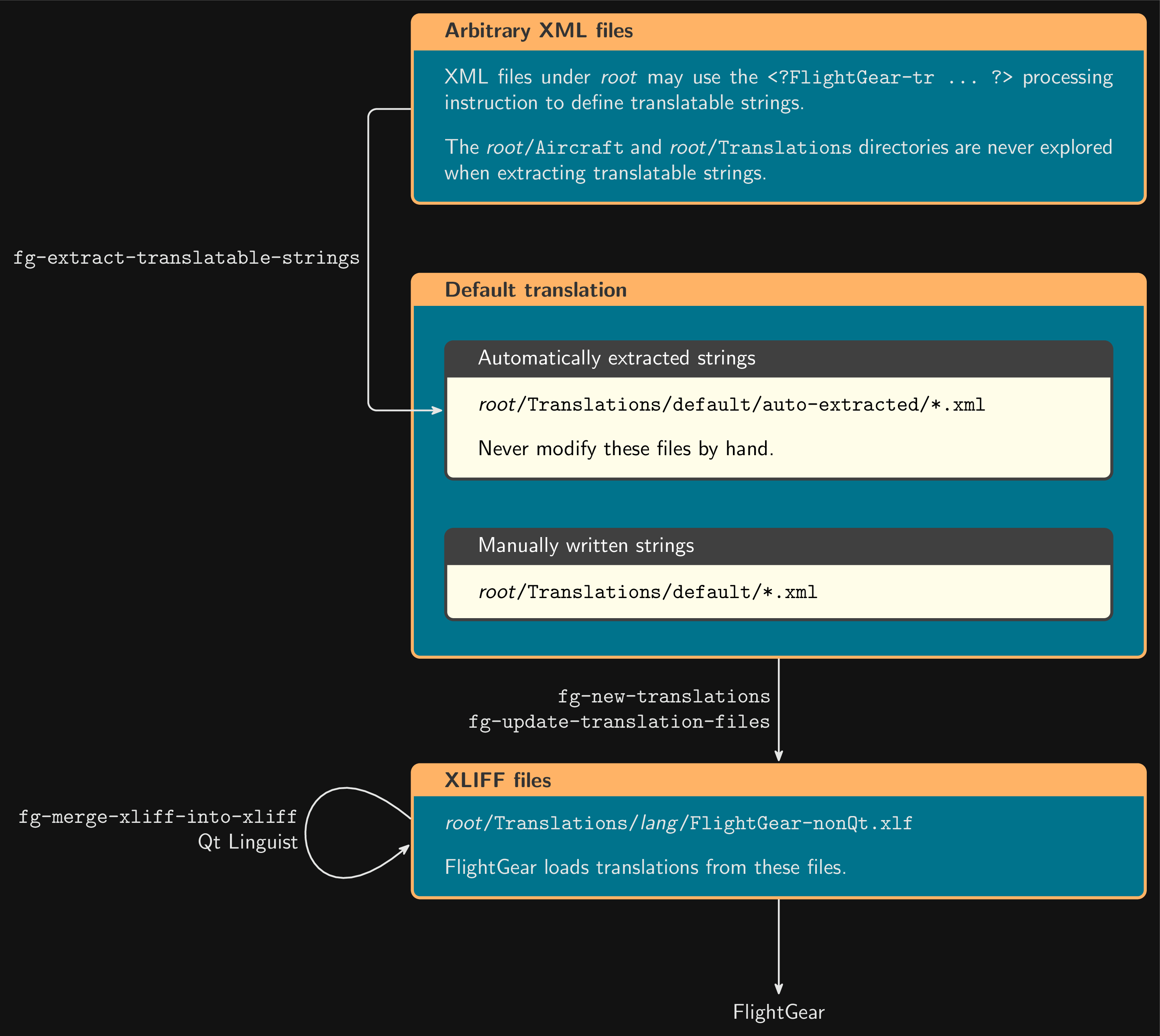
The non-Qt translation workflow#
The translation scripts work on a directory hierarchy that has to be specified
and corresponds to either FGData or an aircraft or add-on. The root directory
of this hierarchy is noted root here.
Todo
The following explanations are probably too detailed for this place.
In the simplest case, translatable strings are manually written to XML files
in root/Translations/default/. These can be readily found by scripts
such as fg-update-translation-files to update the XLIFF files
(i.e., those that translators can work on and that FlightGear reads at
startup).
Other translatable strings are by necessity located outside
root/Translations/ (labels of GUI dialogs, etc.). These have to be
extracted from their natural place to some location where
fg-new-translations and fg-update-translation-files can
find them. This is the job of the fg-extract-translatable-strings
script. It searches for XML files under the designated root
directory, extracts strings that are marked using the <?FlightGear-tr ...
?> processing instruction and writes the extracted strings to XML files in
root/Translations/default/auto-extracted/. These files mustn’t be
manually edited; every change to these files must be done by invoking
fg-extract-translatable-strings. This ensures that the extracted
strings can always be mechanically derived from their sources (that is, the
location where the strings are declared with <?FlightGear-tr ... ?>).
Whenever you add, delete or modify an extractable translatable string—for
instance, in an XML dialog file—, you should run
fg-extract-translatable-strings and commit the resulting
root/Translations/default/auto-extracted/*.xml files along with the
modification. If this shows more changes than what you did, it means someone
most likely forgot to do so in a previous commit (i.e., source and
extracted strings were already out-of-sync before your modification).
When extracted strings are properly synchronized with their sources, the
command fg-extract-translatable-strings write /path/to/root does not change
any file. Thus, one typically runs this command followed by git status to
make sure extracted strings are in sync with their sources.